

Before defining Dynamic Range, we need to understand that there are 2 types of exposures for every image typically speaking. One is Captured Exposure, and other is edited/final exposure like fixing highlights and boosting shadows in post-processing stuff like that. Now there are people like me who shoot SOOC and share the image sometimes without any post-processing, which means we are trying to live with single “Captured” exposure.
When we are pressing the shutter release button, sensor exposes to the scene, and the pixels on the sensors are filled with rays of light or photos or whatever you called it. Some pixels get saturated quickly with the light rays causing highlight clipping (means no details captured) and some remains dark, very dark because there is not enough light-filled in them (means no details in shadow as well). And when we look into those “CAPTURED” pixels in photo editing software like Lightroom or Photoshop or any other image editing software, we often end up editing them to get our desired results. Even most of the times, we are using Instagram filters to get the “look” we want.
So, what exactly happens when we edit the image? When we are moving the sliders trying to reduce the highlights, it SUBTRACTING the LIGHT in each pixel which is already filled. It’s like you are trying to empty the cup a bit because it is spilling the liquid inside it. Same goes for recovery shadows. When we try to recover shadows, basically we are “Artificially” filling the LIGHT in the darkest pixels to bring out the details.
Now on paper, it looks so easy to read. But in reality, it is the most challenging part. How difficult? Let’s find out…
When we captured the image, the pixel level is recorded, and it cannot be changed inside the camera. It’s done. Like you cannot add BOKEH, sharpness, and micro-contrast after pressing the shutter release inside the digital camera. Therefore, seniors and pros always say this. Fix everything before you capture the image. When you done capturing image, the camera SNR firmware does many things with the captured RAW file, from the signal getting out from the digital sensor, cooking it with Analog-to-digital converter and then add “secret” algorithm with the RAW file which defines how much latitude we can have later to add or subtract light into each pixel in post-processing. These secret algorithms produce by all these camera companies are the major game-changer. So, what exactly SNR firmware does?
- Defines the camera Dynamic Range like how much light you can add or subtract into each pixel AFTER capturing the image.
- Reduces Noise in the final RAW file. Note that noise has 6-7 different frequencies into the RAW file. SNR firmware job is to filter them out and create cleaner images.
- Efficiently operates the Analog-to-Digital Converter which comes after the sensor and makes a clean final output file before it dumps into the camera memory card slot.
When you import the RAW file inside any image editor, it starts reading the profile attached to it. That profile contains the color information and other stuff like EXIF details. Then when you start moving sliders of highlights and shadows, image editing software reading the RAW file and it starts filling or replacing those signal details with those which you are trying to dial in. For example, take a look below the example. It is dark and underexposed. I shot it purposely like that using such EXIF that image appears dark.

Now I fixed the exposure by adding 2 extra stops of light in Adobe Camera RAW.
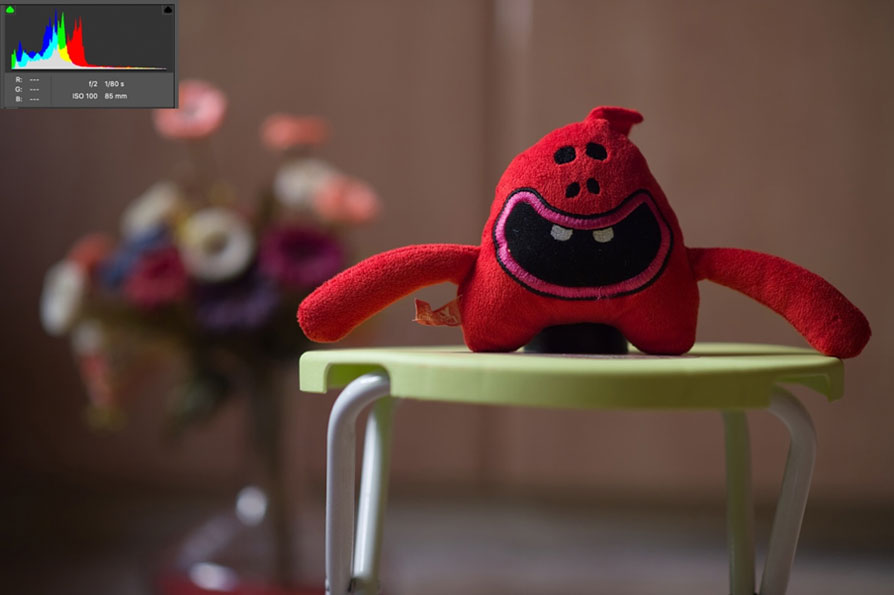
So, what exactly happened? How the image appears so bright after post-processing? What happened was, the signal level in most of the pixels were very low. Using Adobe Camera RAW, I “artificially” filled them with light. But here is the crucial thing that you need to notice. Adobe Camera RAW is a universal software. It requires some protocol which communicates with the RAW file, and there must be someone inside the RAW file which communicates with the outside world of Adobe Camera RAW and then translate those adjustments which I did in above example.
That particular “someone” inside the RAW file is SNR firmware which translates the signal from Adobe Camera Raw software to the Pixel and commands them to fill the exposure as per your need. If that software is not that strong enough, no matter how much exposure you will try to push inside the pixel, it cannot go beyond certain threshold regardless of the pixel capacity. Consider it kind of translator, and you are; heavily depending on that translator. BTW, that protocol which communication with the RAW is a software patch which we often update in Photoshop when every time new camera releases to read it RAW files. You do know that whenever any new camera releases, Photoshop or Lightroom cannot read its RAW file till its patch is released by the Adobe. And when they release that software patch, suddenly life becomes easy for all. Now you know why they release that patch and how it helps us for editing the RAW file for every camera. Here is another example which shows how “intelligent” this SNR firmware is and how smartly they can recover the details in post-processing using Artificial Intelligence. I shot this using Nikon D750. The image post-processing overblown more than +5EV.

And this is the result, check how much about of details I was able to recover from the pixels which were all filled with light. How intelligently Nikon D750 was able to recover the details.

Now some of you still confuse how simple software inside the camera defines the Dynamic Range and what image editing and all those lights adding and subtracting have anything to do with camera SNR firmware and Camera Dynamic Range. Take a look below example. There are 3 different cameras from Nikon
- D700
- D3
- D3s
All these cameras contain the same sensor, which is 12MP, but all 3 have different SNR firmware causing their performance radically different.
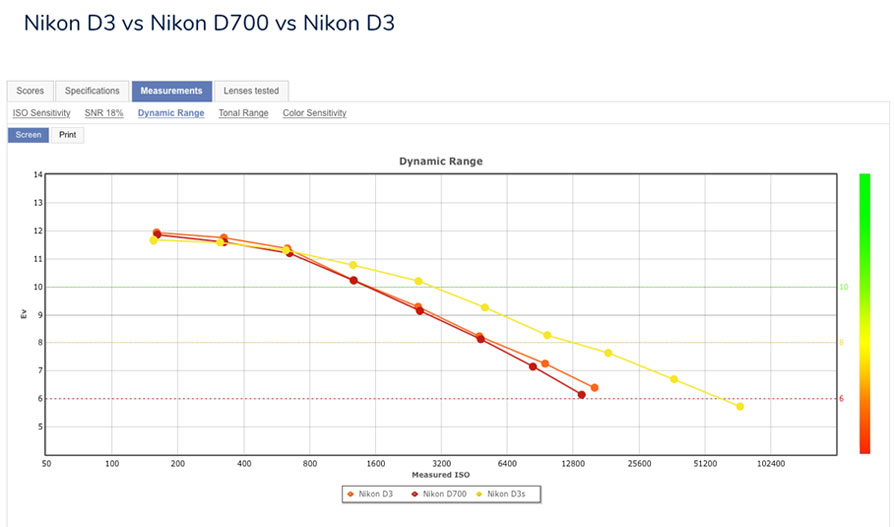
D3s contains the superior SNR firmware version inside it which ultimately giving better ISO performance and also better highlight and shadow details recovery in compared to D700 and D3.
People are underestimating the SNR firmware role in camera performance. Some don’t know its significance at all. Sensor Silicon wafer technology and its characteristic is limited. It’s like you have an Orange in your hand. Either you can take the orange juice out from it by squeezing it by hand which ultimately not going to give you much juice in the end or use the machine for more efficient output and get more juice out from the same orange. Consider SNR firmware a tool.
In brief, the Dynamic Range of the camera is more about the captured image rather than capturing the image at any given exposure. Camera Dynamic Range performance is heavily depending on the software inside that particular camera rather than just a sensor. Each passing year camera companies are developing more efficient and advance version of this SNR firmware. The best example of the advance firmware is Sony A7S2. It has the same 12MP, but its ISO performance and detail recovery are surpassing the Nikon D3s which is also containing the same 12MP.
Another example if Nikon D3x and Nikon D750. Both contain the same 24MP, but D3x ISO performance maxed out at ISO1600 whereas D750 is kicking around easily up to 12,800 ISO. I believe these examples are enough to stress the importance of the SNR firmware which defines not only the camera Dynamic Range but also its overall performance.
For more such technical information, please tune to VUE BLOG.
