

Every single time when you watch any of these YouTube videos related to photography from all these big names, controversy arises. All the audience get confuses in the end, and they are ending up having money in their pockets for having the most views. This is how all these YouTubers are making money by making controversial videos rather than doing actual photography.
I came across this video from a famous YouTuber where he claims that using a full-frame lens on an APS-C sensor and vice versa can produce less sharp images. I am feeling sorry for this gentleman who still brags about this point after having well over a million followers on his YouTube channel, why to make such a statement which is not valid at all and then use all the brainpower to justify it using a senseless example!
This is what exactly happens in reality, and this is not my opinion; this is a fact which you can verify using any technical guy who repairs cameras and lenses for quite some time. When you mount the lens on a camera, the lens has no idea what kind of sensor is beneath it. Its job is to create a circle of the project on a sensor that is wide enough to cover the sensor area. If you are using a full-frame lens, it is producing a bigger circle of light to cover the sensor. If you are using crop sensor lens, it is producing small circle of light. But if you are using a smaller sensor lens on a bigger sensor camera, this happens, you get heavy vignette as lens circle is not enough area of projection which can cover the whole sensor. Just look at the Green and Red below.

Also, this is a known fact that all lenses are an engineer to make the sharpest in the center, which will be covering most of the sensors. In reality, the lens circle of the project of the “same format” goes beyond its native sensor size. It is designed for so sensor exposes for the best area of the lens it is attached.
What I did today was a little experiment to put the claim of that famous YouTuber and people who believe that he is right to the test. I used the following two lenses in my quick experiment,
- Nikon 600mm f/4 AI-S, as I believe its circle of the project is wide enough to cover the sensor up to Medium Format, which it did but of course with some visible vignette.
- Nikon 17-55mm f/2.8G DX lens, which is made for crop sensor only, but it is the only lens which is having massive light projection after 30mm focal length, which is big enough to cover the full-frame sensor.
The camera bodies I used are the following,
- Nikon D500 20MP camera
- Fujifilm GFX 50R Medium Format 50MP camera
Now you all must be wondering why I choose these two cameras. There is a very basic and kind of scientific reason is which that famous YouTubers didn’t mention clearly, which is the resolution of the cameras. If you have two cameras, both 24MP, one is full-frame, and the other is APS-C, though they both are 24MP cameras, the number of pixels per square mm is entirely different. Here I also like to clarify one important point, which is, please do not mix the crop sensor multiplication factor with megapixels as they are entirely different things. To have a clarity and uniform baseline, you need to have similar or near similar resolution at the pixel level to get the lens test. Take a look at the below example; I have drawn two different formats with two different resolutions. Yellow is 25 MP small sensor. Red is 13MP bigger sensor.
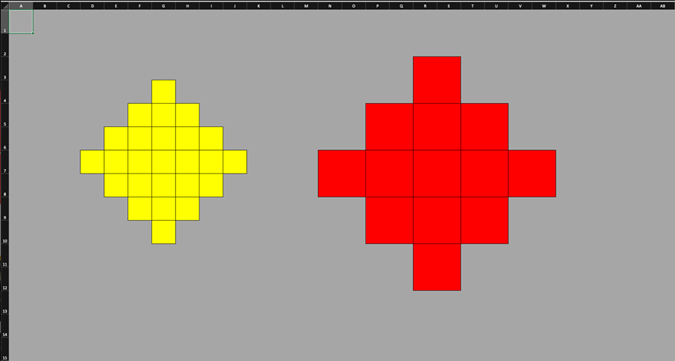
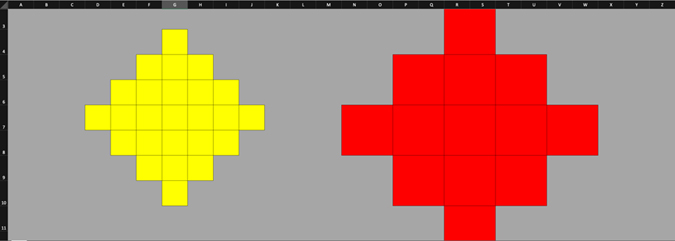
But what if try to ENLARGE or zoom the Yellow sensor output along with Red bigger sensor output, I will start losing the resolution of the Red bigger sensor output, and this is precisely what happened in that famous YouTuber video. Take a look below what happens when I zoom at 200% below image while the above image was at 100%.
Now to make this simple, I scaled the resolution of both Yellow smaller sensor and Large Red sensor the same. Check this out,
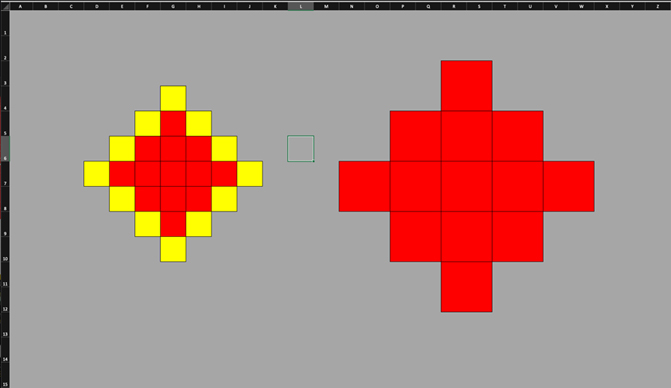
Now no matter how much zoom I will do, the resolution will be the same from both Yellow smaller sensors and Large Red sensors. So, this is why I carefully choose D500 and GFX 50R. Now again, you must be wondering how come both having the same resolution, which you mentioned above. One is 20MP crop sensor and another BIGGG Medium Format 50MP sensor. Let me break it down for you.
Nikon D500:
Sensor Size: 23.5 x 15.7 mm
Pixel Count: 20.9 MP
Pixel Pitch: 4.2 µm
Now I should be using the Nikon D850 here who got 46MP sensor output and got the same pixel pitch, which I nearly identical to D500, and it is 4.3 µm. But unfortunately, I didn’t have it, so I choose Fujifilm GFX 50R, which is at my disposal right now and its 50MP, and it’s nearly 46MP. So yes, I took the liberty a little here and added extra 4MP but tried to get the close pixel pitch I can with D500. Note that any full-frame 24MP camera has a huge pixel pitch, which is 6.0 µm and there is a huge difference from 4.2 to 6µm, unlike in the below case. BTW you can have the whole database of the pixel pitch using this link.
Fujifilm GFX 50R:
Sensor Size: 43.8 x 32.9 mm
Pixel Count: 51.4 MP
Pixel Pitch: 5.3 µm
Now, as we have made the pixel density similar (or near similar in this case), I did the test and checked the images on Adobe Lightroom.


At first glance, the image from the Medium Format GFX 50R looks strange when we talk about using the same lens, right! But I am happy to see that the 600mm f/4 lens cover a LOTTTT of Medium Format sensor, its circle of the project is massive, which I already explained above.
Now, the next step is how you are viewing those pixels to compare side by side. How much zoom are you going to do to see the clear difference between the claims that famous YouTubers did in his video? To view them, we need to learn the multiplication factor.
When we jump from the Full Frame to the APS-C, typically multiply the focal length by 1.5 (for Canon, it’s 1.6). So 100mm of Full Frame on Nikon Crop sensor camera start giving 150mm equivalent angle of view, and on Canon APS-C cameras, it will start giving 160mm equivalent angle of view, but in reality, the lens compression remains the SAME which is 100mm, keep that in mind. So, the equation is
Full Frame > 1.5x > APS-C (multiple both focal length and aperture values to get the true equivalent output).
Now, what happens if we change from Medium Format to Full-Frame?
Medium Format > 1.28x (for GFX 50R) > Full Frame
So, what if we change the medium from Medium Format to APS-C?
Medium Format > 1.28 x > Full Frame > 1.5x (or 1.6x for Canon) > APS-C
Medium Format > 1.92 (~2x) > APS-C
Now we know that to view images of the Medium Format, I have ZOOM-IN up to 2x to get the equivalent angle of view. I already made the pixel density nearly the same by carefully choosing the selected camera bodies. Now, as pixel density and angle of view are normalized, following are the result of using a Full Frame lens on the APS-C and Medium Format camera ….. Let me know if you find any difference when it comes to image quality.


This simple, quick experiment which I made proves that to evaluate any lens output on different sensor size; you need to do the following,
- Normalize the pixel density to get a similar or near resolution so you cannot lose any details on both sensors you are comparing the same lens.
- You need to make sure you are using the right multiplication factor on the viewing to get the same level of pixel peeping as you already normalized the number of pixels.
Ones you have done that, only then you can evaluate the lens sharpness at ANY format. The lens is a lens. It cannot and will not choose to perform good or bad on its own by switching sensor to sensor. BTW, you can download the raw files to pixel peep by yourself of the examples I shot and shared in this blog by yourselves using this link.
Happy learning, everyone.
