

An accident happens in photography, so we better equipped with the right tools to recover from the impact that we will be having from that accident. Last week I did some corporate shoot with data redundancy in the camera. As my camera got 2 card slots, so now I shot RAW + RAW. Just to make sure that I will be having my data on any card I want. So, I did the corporate shoot, and I did not take the backup of the files as I felt very lazy. On the last weekend, I shot some makeup related shoot using the same camera so I thought now I will dump all data into my home computer and will edit the images.
When data dumping happened into the home computer, due to the client pressure, I only copied the makeup related images into my desktop and FORMAT both card of that camera using camera built-in feature, without having any second thought that I yet have to copy the corporate shoot images which I have not even looked into yet. Later this week, when I was asked where the corporate shoot images are? It literally took me some minutes trying to recall where exactly I put the image last time. But I soon realized that I have not even looked at the images, so it means that they are still in the SD card ….. but I formatted the card 3 days ago. And then I realized …. Damn!!!!! It hit my mind that I format the card without taking the backup of the corporate shot (because of my laziness of taking back up).
Today morning when I was asked again about the images, I have to 2 options, either to tell the management that I lost the images due to my foolishness or to recover the images. Then suddenly, a bolt of lightning struck me, and it came into my mind …. Data Recovery Software!!!! I have data recovery software which I used to like years ago, and it can recover the data even from the formatted card. I quickly installed that software again into the laptop and put the SD card into the scan. It took like around 1 hour for the software to do the deep root scan and showed me 4072 RAW files inside the Fully formatted SD card. Instead of full recovery, to save time, instead of the full card, I only recovered selected images of the corporate shoot. I am sharing the screenshot of the screen where it is clearly shown that card is 128GB and it is formatted with full capacity available. And still, that software which I used to recover the data able to recover 4092 files out from this card. Even I am seeing some images which I shot in 2018 using this card. Thanks to the mighty one I can recover my targeted corporate shot RAW files.

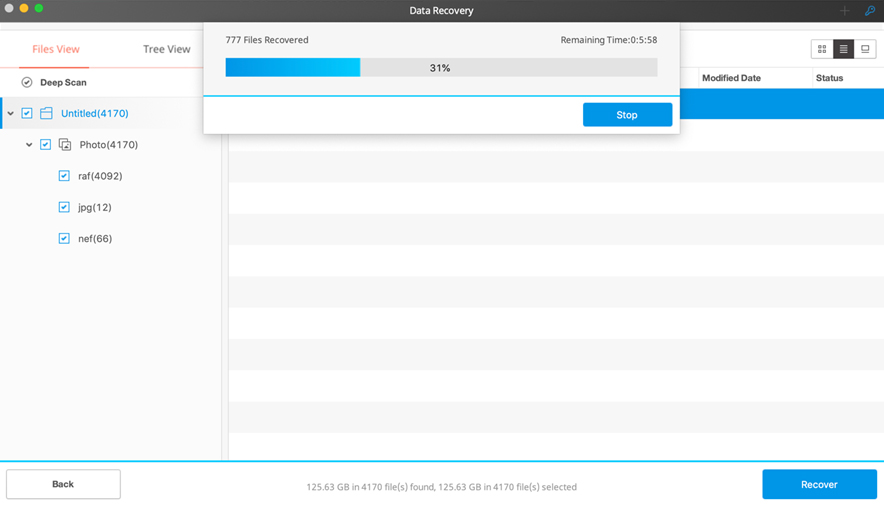
This is another lesson for me which I like to share with all of you that… Data redundancy is critical and doesn’t be lazy in the making back up of your data even if you have done it daily. Sometimes in a rush, we make mistakes which cannot be undone. I am using “Wondershare Data Recovery” software, and yes, I paid for it.
Wondershare Data Recovery software is available for Windows and Mac
